How to find the Calendar ID for a Group Calendar
How to Find the Calendar ID for a Group Calendar
Each group calendar in your CRM has a unique identifier, known as the Calendar ID. You'll need this ID to embed the calendar on a website or integrate it with other tools. Follow the steps below to locate it.
Step 1: Access Your Calendar Settings
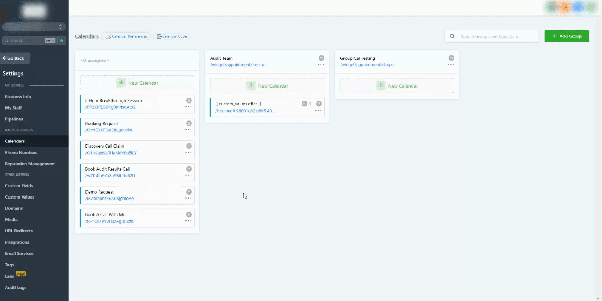
First, navigate to the main calendar area within your CRM. Look for a settings or configuration menu related to your calendars.
Step 2: Open the Calendar Code Section
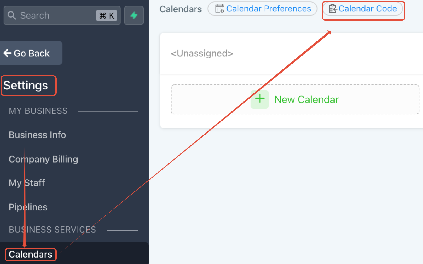
Within the calendar settings, locate the option for "Calendar Code" or a similar label. This is typically found near other calendar management buttons.
Step 3: Identify and Copy the Calendar ID
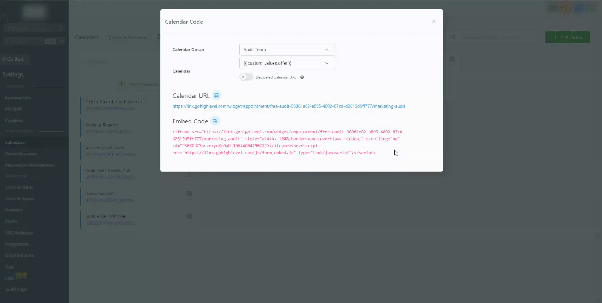
After selecting the calendar code option, you will see an embed code or a dedicated URL for your group calendar. The Calendar ID is the unique string of characters within this code. You can copy the entire embed code or just the ID portion.

Frequently Asked Questions
What is the purpose of the Dedicated Calendar URL?
When you use the dedicated calendar URL, the booking widget will open directly to that specific calendar. This prevents users from navigating back to the general calendar list using the browser's back button, creating a more focused booking experience.