Allow duplicate contact explained
Allow duplicate contact explained
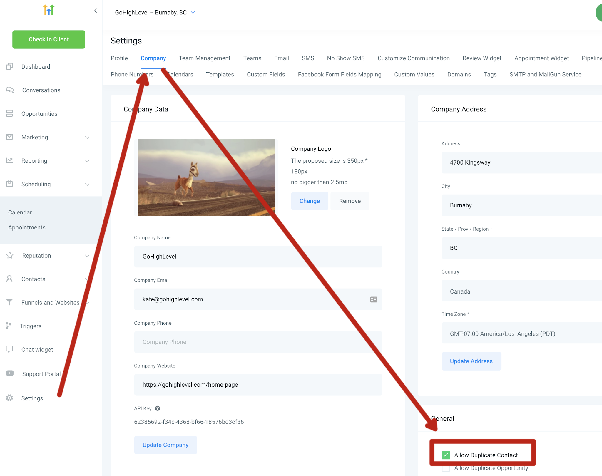
The Allow duplicate contact setting in your CRM plays a specific role when importing or adding new contacts to your database. This setting is designed to control whether duplicate contact entries are permitted under certain import scenarios.
When does this setting apply?
This option primarily affects contacts imported through third-party integrations like Zapier or forms connected to your CRM. When enabled, it allows the creation of multiple contact records with identical email addresses or phone numbers during these types of automated imports.
When does it not apply?
Note that this setting does not apply to CSV file uploads. When importing contacts via CSV, your CRM will always prevent duplicates based on email or phone number. The system automatically merges matching records to maintain a clean, unified contact database.
Default behavior
By default, during most import processes, your CRM will attempt to match new contacts with existing ones using email addresses and phone numbers. When matches are found, information is merged rather than creating duplicate entries. The "Allow duplicate contact" setting gives you flexibility for specific integration scenarios where you might want to preserve all incoming records regardless of duplicates.
To modify this setting, navigate to your CRM's integration or import settings area where you can enable or disable duplicate contact creation according to your preferences.