How to Migrate My Agency Over to LC - Email
How to Migrate Your Agency to CRM Email
CRM Email is a built-in email service that eliminates the need for agencies to manually set up third-party providers like Mailgun or SMTP. With CRM Email, you can send and receive emails directly within the platform, and it’s automatically available for all new subaccounts from day one.
This guide will help you migrate your agency and existing subaccounts to CRM Email smoothly.
Set CRM Email as Your Default Provider
To begin, navigate to your Agency Settings and locate the Email Services section. If you see an option labeled "Use CRM Email," select it to set CRM Email as your default email provider.
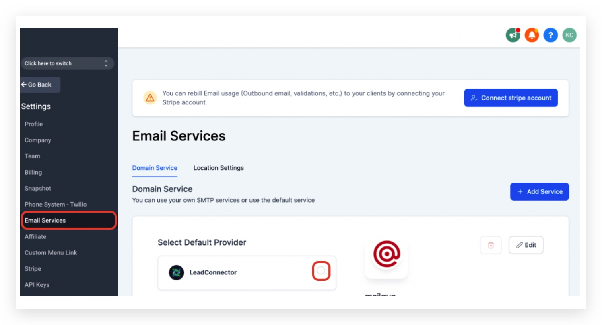
Note: Enabling CRM Email at the agency level will not automatically update subaccounts that already use an external SMTP or Mailgun integration. You’ll need to remove those integrations individually, as described below.
Once enabled, all new subaccounts you create will use CRM Email by default. You can still choose to integrate a custom SMTP or Mailgun account for any subaccount if needed.
Resolve Domain Conflicts
If you try to add a domain or subdomain and receive an error stating that the domain is already configured in a Mailgun account, you’ll need to remove it from Mailgun first.
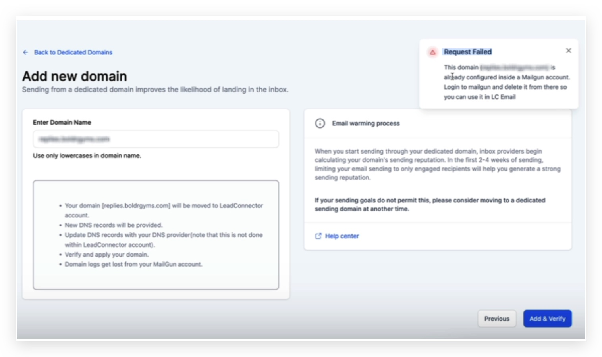
Log in to your Mailgun account and delete the domain configuration there before attempting to use it with CRM Email. If you believe the domain should not be tied to an existing Mailgun account, please submit a support request for assistance.
Remove Existing SMTP Integrations
For subaccounts currently using an external email provider, follow these steps to switch them to CRM Email:
- Ensure CRM Email is set as the default provider in your agency settings.
- Go to the subaccount’s email integration settings.
- Locate any existing Gmail or SMTP integrations and click the trash icon to remove them.
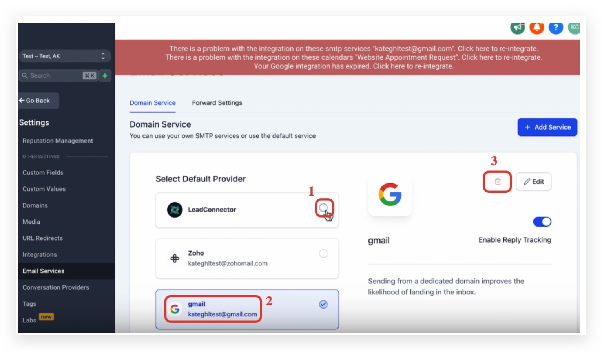
Once the external integration is removed, the subaccount will automatically use CRM Email. You can confirm the switch by checking for one of the following sending domains in your settings:
- mg.msgsndr.org
- mg.msgsndr.net
- replies001.msgsndr.com
- replies.msgsndr.com
- replies000.msgsndr.com
- ec1.msgsndr.org
- ec1.msgsndr.net
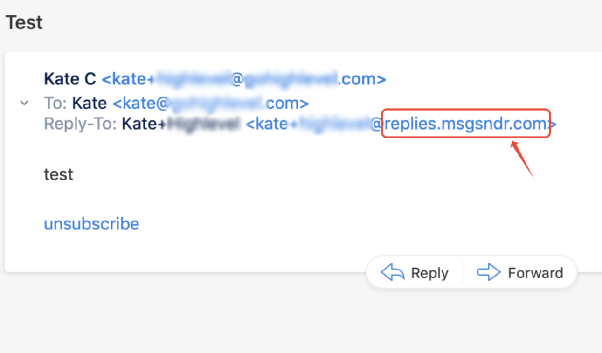
After completing these steps, your agency and subaccounts will be fully migrated to CRM Email, allowing you to send and track emails directly within your CRM.