Introducing Enhanced Sub-Account Filtering: Manage Email Providers with Ease!
Introducing Enhanced Sub-Account Filtering: Manage Email Providers with Ease!
We are excited to announce a powerful new feature designed to streamline how agency users manage their sub-accounts' email configurations. You can now filter your sub-accounts based on their email provider, giving you greater control and visibility over your client accounts.
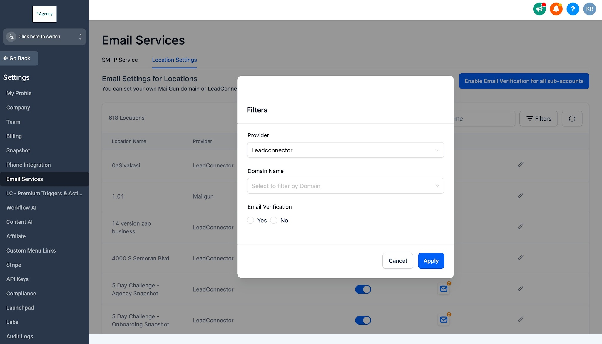
How to Filter Sub-Accounts
Within your CRM's agency dashboard, navigate to the section where you manage your sub-accounts. You will now find options to filter the list using the following criteria:
- Provider: View sub-accounts that are using a specific email provider.
- Domain: Narrow down the list by searching for sub-accounts associated with a particular domain name.
- Email Verification: Filter sub-accounts based on whether their email sending capability has been verified or not.
Managing Different Email Providers
The filtering tool organizes sub-accounts into groups based on their primary email service. This allows you to perform bulk actions on accounts using the same provider.
CRM's Integrated Email Service
- Filter to see all sub-accounts using the CRM's built-in email service.
- For selected accounts, you can update the sending domain.
- You can also enable or disable email verification for these accounts in bulk.
Mailgun
- Filter to view sub-accounts configured to send email via Mailgun.
- You have the option to switch the provider for selected accounts to the CRM's integrated service.
- You can also modify the associated Mailgun domain for the chosen sub-accounts.
Other Providers (e.g., Gmail, SMTP)
- Filter for sub-accounts using other email services, such as Gmail or a custom SMTP server.
- For these accounts, you can change their provider to the CRM's integrated email service.
This enhancement provides a centralized and efficient way to manage email settings across all your sub-accounts, saving you time and simplifying your workflow.