How to Set Up Automatic Taxes for Fast Payment Links
What’s New?
- Business users can now set up and implement automatic taxes on Payment Links with ease.
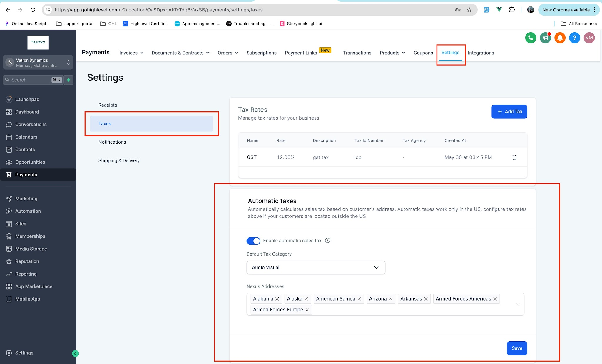
- When enabled in the Settings under Payments -> Taxes, automatic taxes will be applied to the product during checkout.
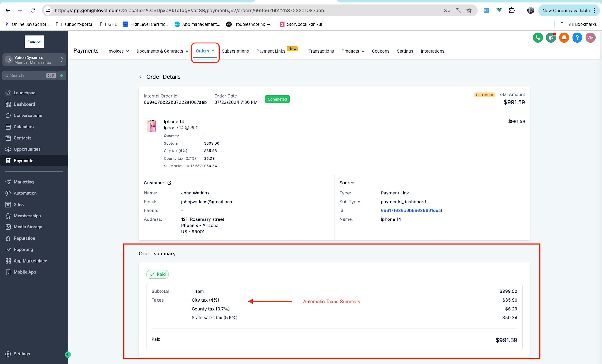
- Automatic taxes would be applied to subsequent transactions also for recurring products
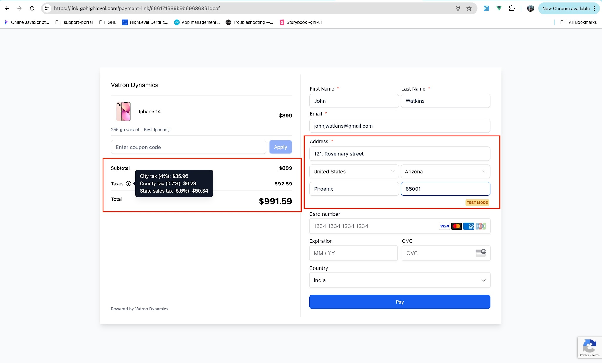
- The payment link must capture the customer address in order for automatic taxes to reflect.
- The scope of this feature in Payment Links covers both -one time products, recurring products
Note
- Automatic taxes are available only for customers entering a valid US Address.
- Automatic Taxes would also be applied to recurring products bought via Payment Links.
- Features would be usable across already created payment links also !
How to Use it
- Go to Payments -> Settings - > Taxes!
- Enable Automatic Taxes -> Enter in all the details required
- Go to any live Payment Link via preview or Copy Link Option -> Enter in US Address details and voila automatic taxes would be applied !