Moving numbers out of an LC Phone Sub-account to the client's own Twilio account
Transferring Phone Numbers from Your CRM Sub-account to Your Twilio Account
To move phone numbers from your CRM sub-account to your own Twilio account, you’ll need to submit a support request directly with Twilio. This process requires coordination between you, Twilio support, and CRM support.
Step 1: Obtain Your Location ID
Before contacting Twilio, you’ll need to gather the Location ID for the number(s) you want to transfer. This ID helps CRM support identify the correct sub-account on their end.
Prerequisite: Note down the phone number(s) you wish to transfer and have your CRM account accessible.
Step 2: Contact Twilio Support
Create a support ticket with Twilio using the subject line: Moving numbers request.
Open Twilio Support in a new window to begin.
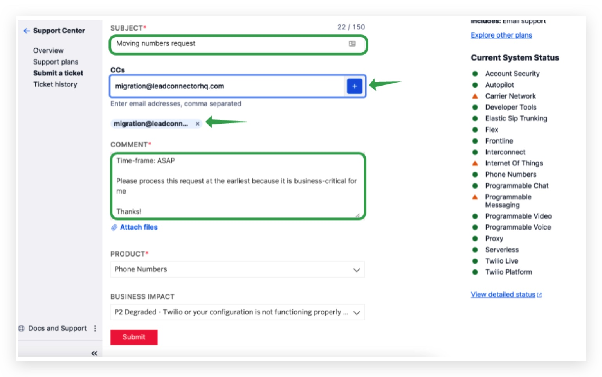
Step 3: Compose Your Request
Copy and paste the following message into your support ticket. Be sure to replace placeholders with your actual information.
Important: CC migration@leadconnectorhq.com on your request so the CRM team can approve the transfer.
Hi Twilio Support,

I would like to move the following phone number(s) to my Twilio sub-account:

+1 [Your Phone Number Here]

Losing sub-account SID:
Please contact CRM support to obtain the ISV location's Twilio sub-account SID where the number is currently hosted.

Gaining sub-account SID:
[Your Twilio Sub-account SID Here]

Time-frame: ASAP

This request is business-critical, so please process it at your earliest convenience.

Thanks!

Product: Phone numbers
Business Impact:
P2 Degraded - Twilio or your configuration is not functioning properly or intermittently
Step 4: Submit Your Ticket
After pasting the message and adding the required CC, proceed to submit your support request.
When prompted whether your issue is resolved, select No to continue.
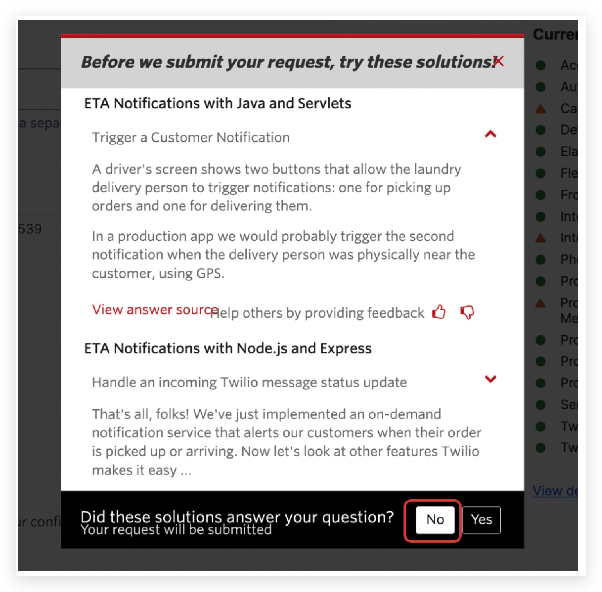
Finally, click Submit Help Request to send your ticket to Twilio.
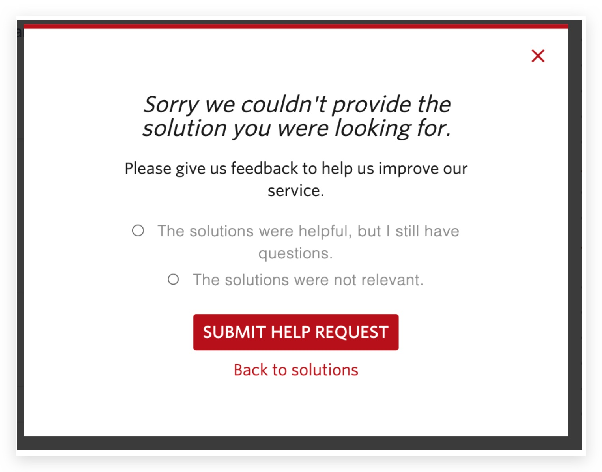
What Happens Next?
Twilio will process your request once they receive confirmation from the CRM support team. The transfer time may vary, but you’ll receive updates via your support ticket. Ensure you monitor your email for any follow-up questions from Twilio or CRM.