How to Add Multiple Chat Widgets to the Same Website
How to Add Multiple Chat Widgets to Your Website
Your CRM allows you to create and manage multiple distinct chat widgets. This is useful if you want to display different contact options (like SMS, Live Chat, or WhatsApp) on different pages of your site or within different funnels. You can install more than one widget on the same website.
Creating a New Chat Widget
To begin, navigate to the Sites section within your CRM dashboard and locate the Chat Widget management area.
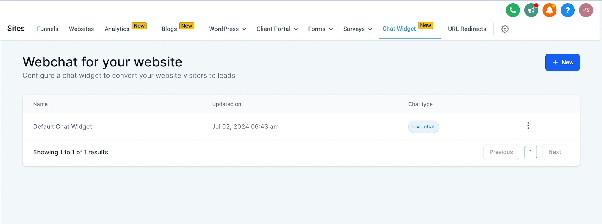
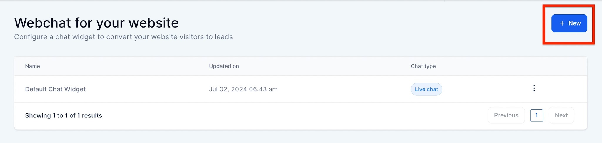
Here you will find an option to create a new chat widget. Click the button to start the setup process for an additional widget.
Configuring the Widget Type
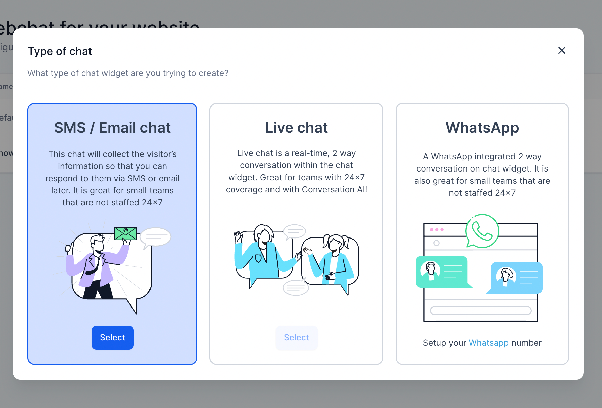
During setup, you will be prompted to choose the primary communication channel for this widget. You can select from three core types:
- SMS/Phone Chat: Allows visitors to initiate a conversation via text message or phone call.
- Live Chat: Enables real-time text-based chatting directly on your website.
- WhatsApp Chat: Provides a direct link to start a conversation in WhatsApp.
Important Note: The first chat widget you ever created in your account is typically considered the default widget. New widgets you create are additional options.
Assigning Widgets to Pages and Funnels
After creating multiple widgets, you can assign them to specific locations. When editing a website page or a funnel within your CRM's site builder, look for the chat widget settings. You should see a dropdown menu or selector that allows you to choose which of your created widgets to use on that specific page or funnel.
For standard WordPress sites using the provided installation code, only the default chat widget will be active. To use multiple widgets on WordPress, you would generally need to implement more advanced, manual integration methods.
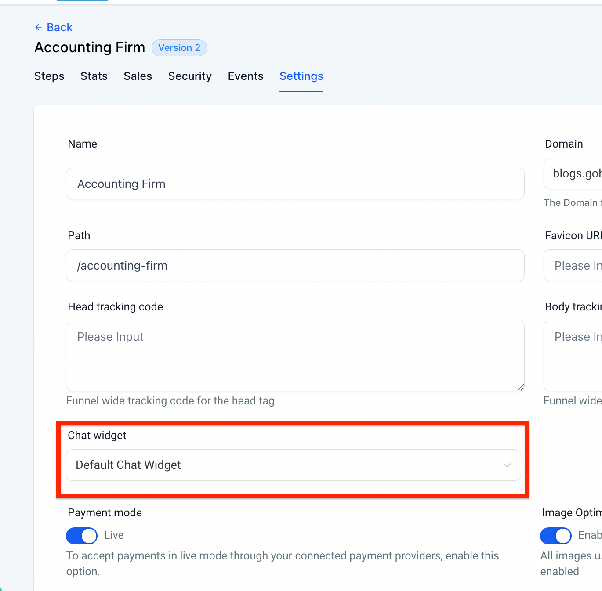
Once you have selected and saved your widget choice for a page, publish your site or funnel. The selected chat widget will then appear and function for visitors on that specific location, allowing you to run multiple, tailored chat experiences across your web presence.