Quiz Builder
The Quiz Builder is a versatile tool that streamlines the process of creating and managing quizzes for educators, trainers, and businesses. With its user-friendly interface and robust customization features, it enables seamless quiz design, learner assessment, and result analysis. Whether you're developing academic tests or interactive quizzes for engagement, Quiz Builder accommodates a variety of needs.
Use Cases
- Lead Nurturing & Marketing: Convert quiz-takers into potential customers by personalizing follow-ups and segmenting audiences for targeted outreach.
- Education & Training: Assess student knowledge, reinforce learning, and personalize instruction through interactive assessments.
- Product & Course Recommendations: Suggest relevant courses, products, or services based on quiz results to improve conversion rates.
- Event Engagement & Interaction: Use quizzes at events to engage audiences, test knowledge, or collect insights.
- Certification & Compliance: Validate skills, ensure compliance with training requirements, and issue certifications based on quiz performance.
- Comprehensive Analytics & Insights: Gain data-driven insights into user responses and quiz performance for strategic decision-making.
- Increased Engagement & Interactivity: Enhance user experience with adaptive quizzes that adjust based on responses.
How to Use a Quiz Builder?
Step-by-Step Guide
- Access the Quiz Builder: Navigate to the Quiz Builder in the Sites tab.
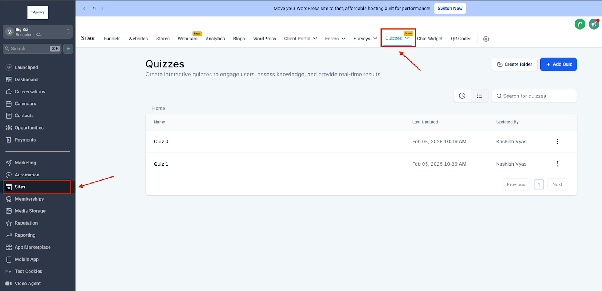
- Create a New Quiz: Click Create Quiz and enter a name.
- Add Questions: Use the left sidebar to drag and drop question types onto slides.
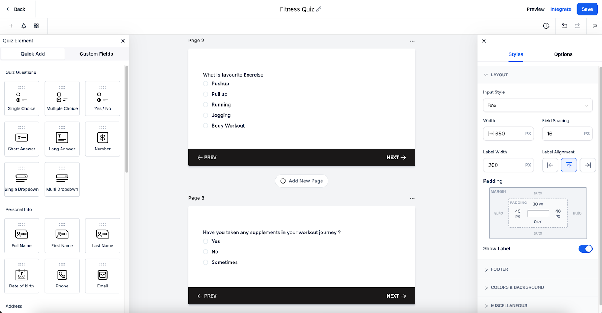
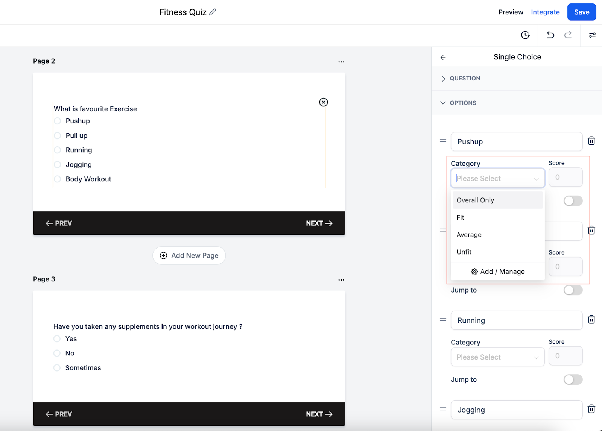
- Assign Categories & Scores: Define scoring for each question to determine the final result.
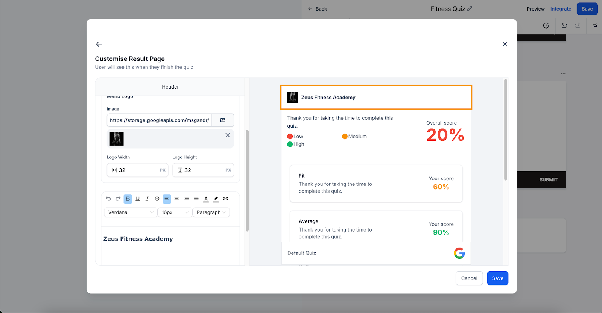
- Customize the Result Page: Use the Quiz Result Builder to personalize the results display.
- Save & Preview: Test the quiz before publishing.
- Publish & Share: Distribute the quiz using direct links, embedding options, or automated workflows.
Features of Quiz Builder
- Drag-and-Drop Interface: Easily create quizzes by dragging and dropping different question types, multimedia, and answer options.
- Multiple Question Formats: Supports multiple-choice, true/false, short answers, and essay questions.
- Scoring System: Customize scoring methods for individual questions and quiz sections.
- Tiers and Categorization: Organize quiz results into categories and assign different score levels.
- Branching Logic: Design quizzes that adapt dynamically based on user responses.
- Quiz Sharing: Share quizzes via direct links or embed them on websites and funnels.
- Result Template Customization: Personalize the results page using the quiz result builder.
What’s Next?
- Question-wise Feedback: Provide specific feedback based on individual responses.
- Dynamic Content for Categories: Tailor content recommendations based on score tiers.
- Additional Result Summary Templates: Expand customization options for quiz results.
- Multiple Questions per Slide: Enable users to answer multiple questions on a single slide.
With these upcoming improvements, Quiz Builder will continue evolving to meet the needs of educators, marketers, and businesses. Stay tuned for updates.
Frequently Asked Questions (FAQs)
1. Can I integrate Quiz Builder with my website?
Yes, you can embed quizzes on your website using the provided embed code or direct links.
2. Can I customize the scoring system?
Yes, Quiz Builder allows you to assign different points to each question and set up category-based scoring.
3. Does Quiz Builder support branching logic?
Yes, you can create quizzes that adapt dynamically based on user responses.
4. How can I analyze quiz results?
You can view detailed analytics and insights within Quiz Builder to track performance and engagement.
5. Can I automate follow-ups based on quiz scores?
Yes, using the Quiz Submitted Trigger in workflows, you can set up automated follow-ups like emails and SMS messages.
6. Is Quiz Builder suitable for certification exams?
Yes, you can create quizzes for certifications, assign pass/fail criteria, and generate certificates accordingly.