Funnel Paths
Funnel Paths
In your CRM, every funnel has three distinct types of URLs that control how visitors navigate through your funnel steps. Understanding these will help you manage and share your funnels effectively.
Funnel URL
The Funnel URL is the main address for your entire funnel. When someone visits this URL, they are taken directly to the first step of the funnel. You can customize this URL in your funnel’s settings to make it more memorable or branded.
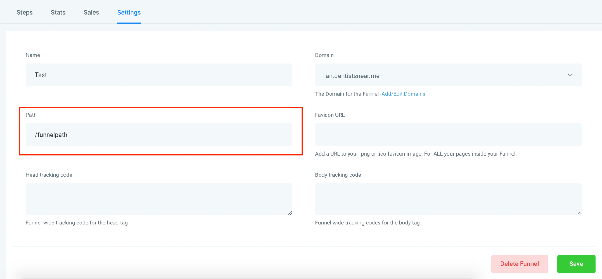
Step URL
Each step within your funnel has its own unique URL. This allows you to link directly to a specific step—for example, a payment page or a registration form. You can find and customize Step URLs in the Publishing tab of your funnel editor.
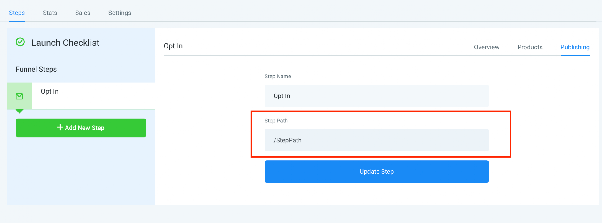
Page URL
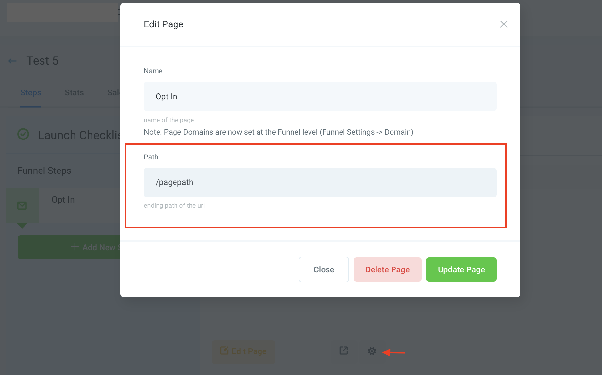
Page URLs are associated with individual pages within a step. Currently, each step contains one page, but this feature will become especially powerful when A/B testing is introduced. In the future, you’ll be able to create multiple page variations under one step and control traffic distribution using unique Page URLs.
To view or modify a Page URL, click the gear icon next to the Edit Page button to open the page settings.
How Split Testing Will Work (Coming Soon)
When split testing is available, you’ll be able to publish a Step URL—for example, in a Facebook ad—and the system will automatically redirect visitors to different page variations (Page URLs) within that step. Traffic will be distributed based on rules you set, allowing you to test and optimize page performance.
For example:
- A user clicks a Step URL shared in an ad.
- The CRM detects the step and redirects the user to either Page 1 or Page 2, depending on your traffic split configuration.