Canonical Link in Blog and Blog Post
Canonical Link in Blog and Blog Post
When you publish similar content across multiple web pages, search engines need to know which version is the main one to display in search results. A canonical link, or canonical URL, is a tag you add to a webpage to tell search engines like Google which page is the original or preferred version. This helps avoid issues with duplicate content and ensures your primary page gets the proper visibility.
For example, you might have these two similar pages:
- Canonical (Primary) URL: https://yourdomain.com/blog/
- Alternate URL: https://yourdomain.com/blog/?page=1
By setting the first URL as canonical, you instruct search engines to index and rank that page, treating the second as a duplicate.
How to Set a Canonical Link for a Blog
You can set a canonical URL for an entire blog within your CRM. This is useful if you have multiple blog listings or feeds with similar content.
- Navigate to the website or sites section within your CRM and access the list of your blogs.
- Locate the specific blog you want to edit and open its settings or editing interface.
- Look for SEO or advanced settings related to publishing. As you prepare to publish or within the blog's settings, you will find a field to enter a canonical URL.
- Enter the full URL you want designated as the primary version for this blog.
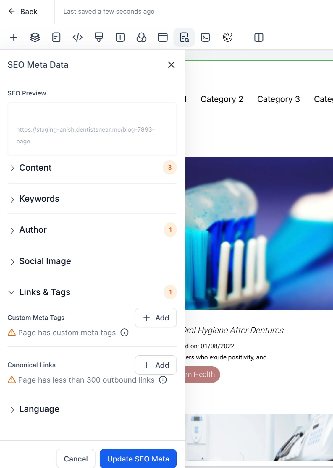
After saving, the canonical tag will be added to the blog's pages, guiding search engines correctly.
How to Set a Canonical Link for a Blog Post
For individual articles, you can set a canonical link to specify if the post's primary version exists elsewhere, such as on an external site or another internal page.
- From your CRM dashboard, go to the website or blogs section and select the blog containing your posts.
- Open the blog to view its list of published and draft posts.
- Edit the specific blog post where you want to define the canonical URL.
- Proceed through the post editor until you reach the publishing or SEO settings area.
- You will find an option to set a canonical link. Enter the complete URL of the page you want search engines to treat as the original source for this content.
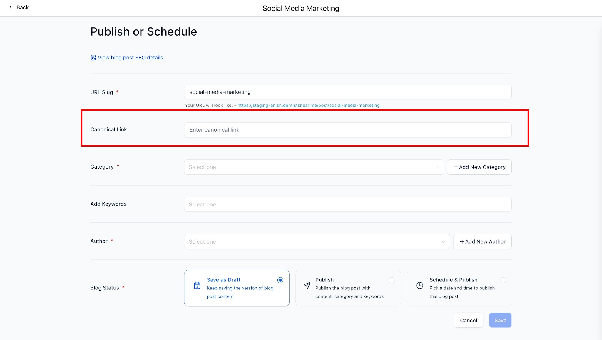
Completing this step and publishing the post will apply the canonical tag to its HTML, helping to consolidate search rankings for that content.