What has changed in Blog
What Has Changed in Your CRM Blog
Blogs are a powerful way to share insights and engage with your audience. To improve your experience, we’ve simplified and enhanced the blog functionality in your CRM. Here’s what’s new.
Simplified Blog URLs
We’ve streamlined blog URLs for better readability and SEO. The new structure removes unnecessary characters and makes your blog paths more intuitive.
For a primary domain (e.g., example.com):
- Blog home: example.com/blog
- Individual post: example.com/post/post-name
- Category page: example.com/blog/category/category-name
- Tag page: example.com/blog/tag/tag-name
- Author page: example.com/blog/author/author-name
For a subdomain (e.g., blog.example.com):
- Blog home: blog.example.com
- Individual post: blog.example.com/post/post-name
- Category page: blog.example.com/category/category-name
- Tag page: blog.example.com/tag/tag-name
- Author page: blog.example.com/author/author-name
Automatic Sitemap Updates
Your domain’s sitemap now updates automatically whenever you publish a new blog post. There’s no need to manually edit sitemap or robots.txt files—your CRM handles it for you.
Open Blog Posts in a New Tab
Blog posts now open in a new browser tab by default, keeping your main site navigation intact. You can further customize the post layout with subscription forms, comment sections, calendars, and other elements.
Enhanced SEO with Canonical Tags
Each blog post includes canonical tags to help search engines identify the preferred version of your content. This improves indexing, consolidates ranking signals, and enhances your overall SEO performance.
Custom Layouts and Card Designs
You can now design your blog with flexible layouts and customize how posts appear in card view. Tailor the look to match your brand and improve reader engagement.
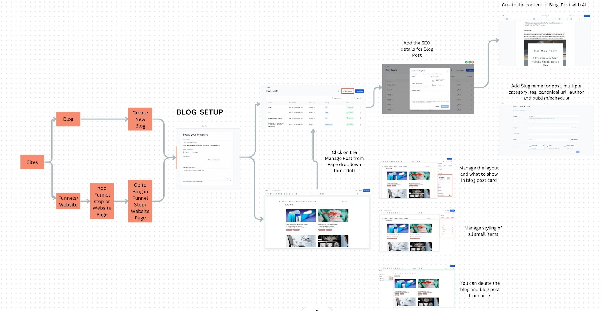
How the New Blog Flow Works
The updated blog flow is designed to improve both content creation and reader experience. It offers better navigation, clearer organization, and more intuitive access to categories, tags, and authors.
What About Existing Blogs and Posts?
Existing blogs and posts created in funnels or websites will continue to work, but they won’t benefit from the new URL simplification, automatic sitemap updates, or canonical tags. These older posts are now part of the Default Blog.
We recommend migrating old posts to the new blog system for full compatibility and improved SEO. New sub-accounts created after this update will use the new blog flow automatically.
How to Migrate Blog Posts to the New Version
Follow these steps to move your existing blog posts to the updated blog system:
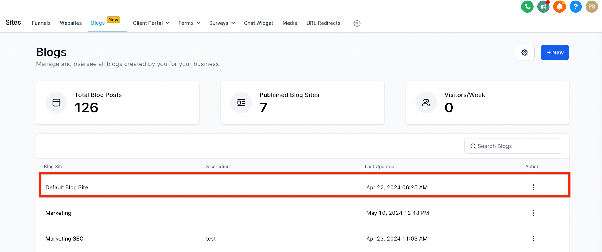
- Navigate to Sites > Blogs in your CRM.
- Locate the Default Blog, which contains posts from funnels or websites.
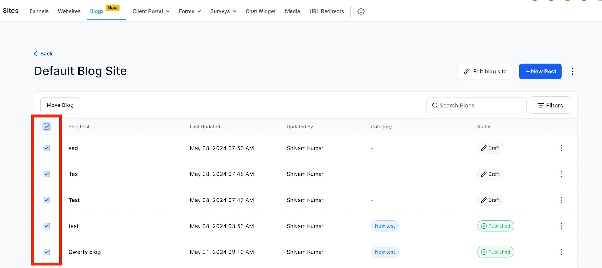
- Select the checkbox next to the post(s) you want to migrate.
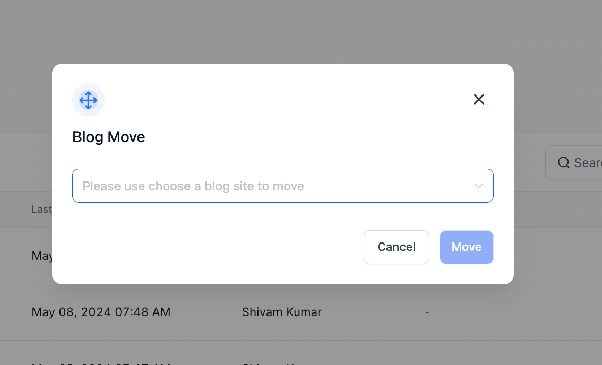
- Click the Move Blog action for the selected posts.
Note: The original URL of the post will change to match the new structure. Update any existing links to avoid broken paths.