How to import Email Template(s) from ActiveCampaign
How to Import Email Templates from ActiveCampaign
You can import email templates from ActiveCampaign into your CRM to reuse existing designs and content. This process requires you to first obtain a shareable link from your ActiveCampaign account.
Before You Begin
Make sure you are logged into your ActiveCampaign account. You’ll need to generate a shareable link for the template you want to import.
Obtain the Shareable Link from ActiveCampaign
- In ActiveCampaign, navigate to Campaigns and select Campaign Templates.
- Locate the template you wish to import.
- Hover over the template and click the settings (gear) icon.
- Select the Share option.
- Copy the share link provided in the modal window.
- Close the sharing window.
Import the Template into Your CRM
Once you have the shareable link:
- In your CRM, go to Emails → Email Templates.
- Click Create New Template and choose the Import Template option.
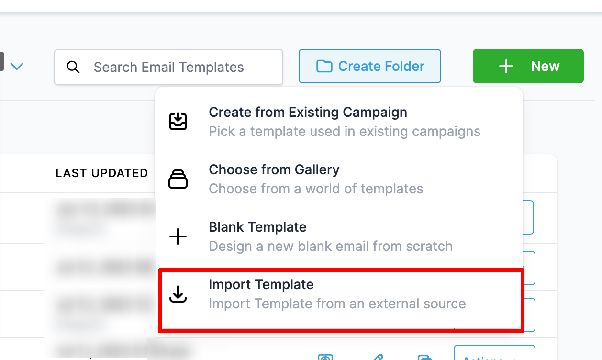
- Paste the ActiveCampaign template URL into the import field.
- Review the preview to confirm the template looks correct.
- Click Create Template to finalize the import.
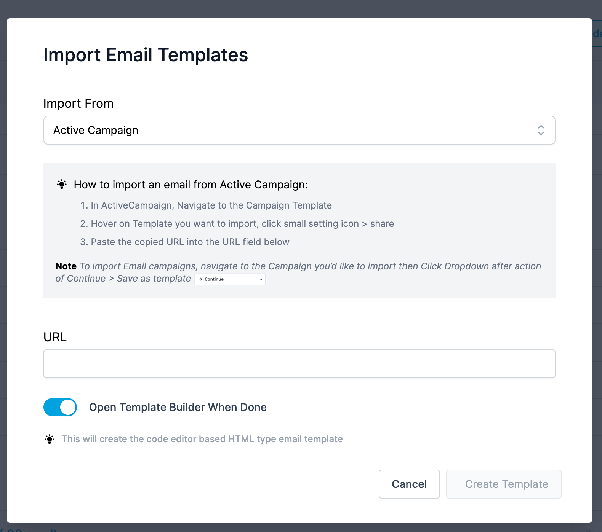
Note: Imported templates are created as HTML (Code Editor) type emails and may require you to provide a name for the template during the import process.
Frequently Asked Questions
Can I import drag-and-drop templates from ActiveCampaign?
This import feature is currently experimental and supports HTML-based templates. We encourage users to try it and share feedback.
How do I name the imported template?
You’ll be prompted to enter a name for the template after clicking Create Template.