Math Calculations in Forms/Surveys
What’s New?
- Custom Field - Score:Users can now add a custom field to calculate scores based on their inputs.
- Calculator: Set up math calculation logic using numerical and monetary fields within forms and surveys using the brand new calculator
- Real-time Calculation:Scores are calculated in real-time during form or survey preview.
- Support of Score in conditional logic: Setup logics and workflows based on scores to redirect to url, disqualify, show/hide fields.
Fields supported right now:
- Numerical type fields
- Monetary type fields.
How Does It Work?
- Adding Custom Field: Navigate to the form or survey builder, drag and drop "Score" field from Quick Add.
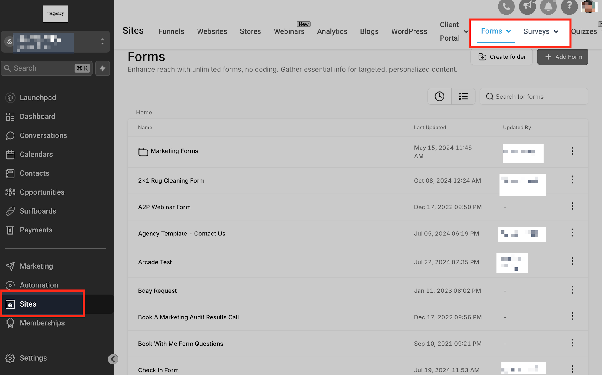
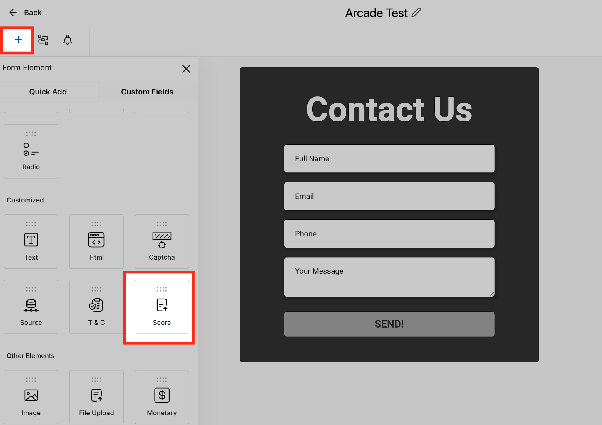
- Setting Up Calculations: Define your calculation logic by selecting the relevant numerical or monetary fields and specifying the calculation rules.
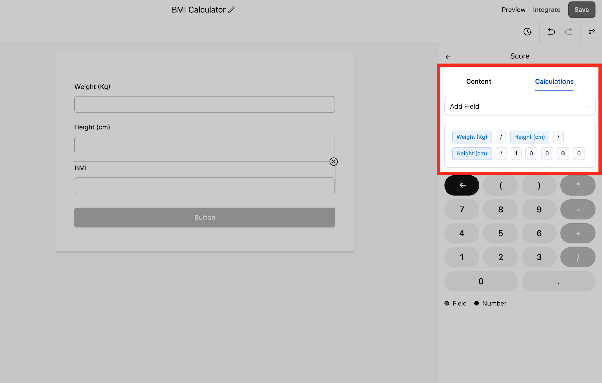
- Previewing: Use the preview mode to see real-time calculations as data is entered.
Why This Feature?
This functionality offers enhanced capabilities for users who require real-time calculations within their forms and surveys. Whether it's for scoring, budgeting, or other specific needs, this feature improves both efficiency and usability, making data processing more seamless and intuitive.