Funnel Paths
Funnel Paths
When you build a funnel in your CRM, there are three distinct types of URLs, or paths, that are generated. Understanding these paths is essential for sharing your funnel correctly and for preparing for future features like split testing.
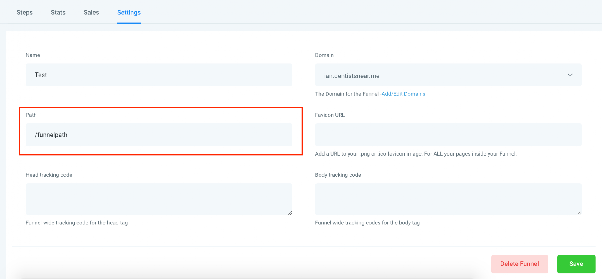
Funnel URL
The Funnel URL is the main, dedicated address for your entire funnel. You can find and configure this URL within the funnel's Settings area. When a visitor uses this URL, they will always land on the very first step of your funnel sequence.
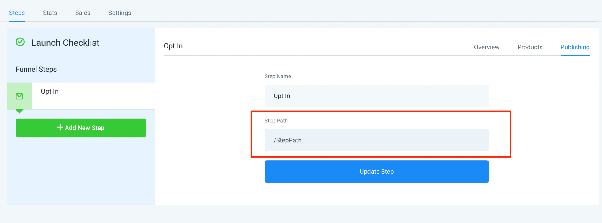
Step URL
Each individual step within your funnel also has its own unique URL. This allows you to send someone directly to a specific page in the sequence, such as a thank you page or an order form. You can view and manage these step-specific URLs from the Publishing tab when editing your funnel.
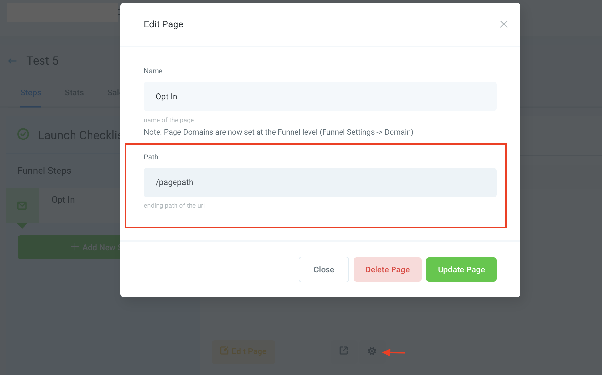
Page URL (For Upcoming A/B Testing)
Currently, each funnel step is linked to a single page. However, a new A/B testing feature is coming soon. Once launched, you will be able to create multiple page variations for a single step.
Each of these page variations will have its own unique Page URL. You will manage traffic distribution and access these URLs through a settings modal, typically opened by clicking a gear icon near the page editing controls.
Here is how split testing will work with these paths:
- You would share a single Step URL with your audience, for example, in a Facebook ad.
- When a user clicks that link, the CRM's system will identify the step and, based on your configured traffic rules, automatically redirect them to one of the variation page's unique Page URLs.
- This allows you to test different page designs or offers while using a single, simple link for promotion.