Show Popup on Entering Funnel/Website
Show a Popup When Visitors Enter Your Funnel or Website
You can configure a popup to appear automatically when someone lands on a page within your funnel or website. This is an effective way to capture attention immediately with an offer, signup form, or announcement.
The primary method for this is to set a timed delay, so the popup appears a few seconds after the page loads, giving the visitor a moment to orient themselves.
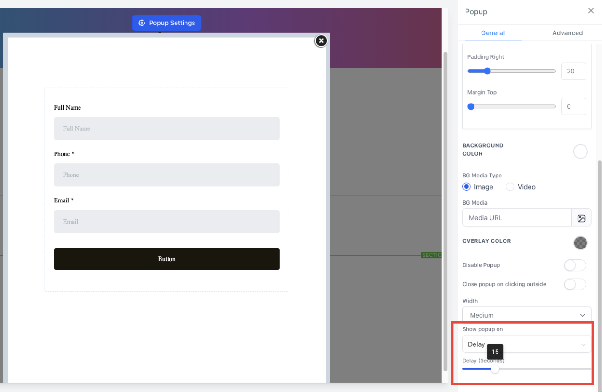
How to Set a Delayed Entry Popup
Follow these steps to create a popup that triggers after a visitor has been on the page for a set amount of time.
- Edit Your Funnel or Website: From your CRM dashboard, navigate to the Funnel Builder and open the specific funnel or website page you want to edit.
- Access Popup Settings: Within the page editor, locate and click on the settings or configuration option for popups. This is typically found in a dedicated popup management section or toolbar.
- Configure the Trigger: In the popup settings panel, look for a setting labeled similar to "Show popup on" or "Trigger."
- Select the Delay Option: From the list of available triggers, choose the option for a time-based delay after page entry.
- Set the Delay Time: Use the provided slider or input field to set the delay duration. You can typically set this from 1 second up to 60 seconds. A delay of 3-5 seconds is common to avoid interrupting the initial page load.
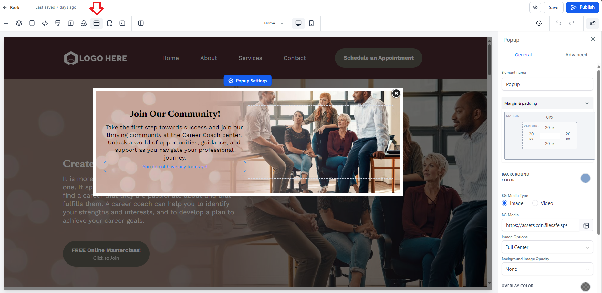
Once you save these settings and publish your page, the popup will automatically appear for new visitors after the delay you configured.
Important Note: If a visitor interacts with or closes the popup before the scheduled delay time has passed, the delayed trigger will be canceled for that user's session. This prevents the popup from reappearing unnecessarily after they have already engaged with it.