A2P Sole Proprietor Brands Registration is Now Live
A2P Sole Proprietor Brand Registration Overview
As of August 31, 2023, all phone numbers used to send SMS or MMS messages to U.S. recipients must be registered under an approved brand and campaign for A2P (Application-to-Person) 10DLC. This article details the Sole Proprietor registration path within your CRM, designed for individuals or small businesses operating in the United States or Canada without an official business tax ID (like an EIN or CCN).
Choosing Your Registration Path
When beginning the A2P brand registration process in your CRM, you will be presented with a key initial choice. Select the option that accurately describes your situation:
- Business Has a Tax ID: If your business has a US EIN, Canadian CCN, or other official tax number, you should select the option indicating you have a tax ID and proceed with a Standard Brand registration.
- Business Has No Tax ID (Sole Proprietor): If you operate from a valid US or Canadian business address but do not have a business tax ID, select the option stating you do not have a tax ID to begin the Sole Proprietor registration detailed in this guide.
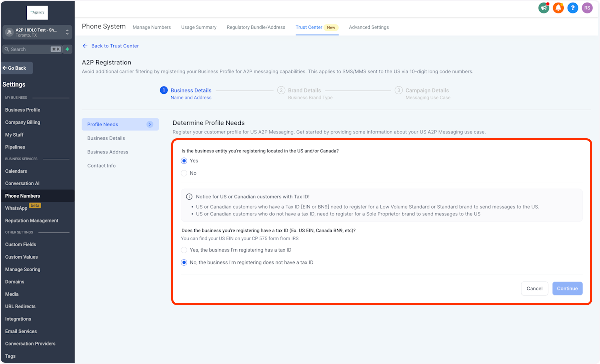
- Business Outside US/Canada & No Tax ID: If your business lacks a tax ID and is not located in the US or Canada, you cannot complete A2P brand registration for standard local numbers. In this case, using Toll-Free numbers after their specific registration process is the recommended alternative.
Sole Proprietor Requirements
To qualify for and successfully complete a Sole Proprietor registration, you must meet these criteria:
- No Business Tax ID: You cannot have an EIN, CCN, or similar business tax identification number.
- Valid US/Canada Address: You must provide a valid physical address located within the United States or Canada. PO boxes in the US are acceptable.
- Accurate Personal & Business Details: You must supply a valid business name, your first and last name, a working email address, and a direct mobile phone number.
- OTP Verification: You must have access to a valid US or Canadian mobile number (not a VoIP/cloud number) to receive a one-time password via text and reply to confirm your identity.
Fees and Limitations
Be aware of the following fees and restrictions associated with Sole Proprietor brands:
Fees:
- One-time Brand Registration: $4.41 (waived for certain previously converted brands).
- One-time Campaign Vetting: $16.55 (may be waived for existing campaigns).
- Monthly Campaign Fee: $2.25 per month.
Limitations:
- Only one Sole Proprietor Campaign is allowed per registered Brand.
- Only one phone number can be associated with that campaign.
- Message throughput is limited to 1 message per second (1 MPS).
- The brand is intended for a single employee/owner.
For higher volumes or multiple numbers, consider formally registering your business to obtain a tax ID and qualify for a Standard Brand registration.
How to Complete Sole Proprietor Registration
After selecting that your business does not have a tax ID, you will proceed through several forms in your CRM's Trust Center or phone system settings.
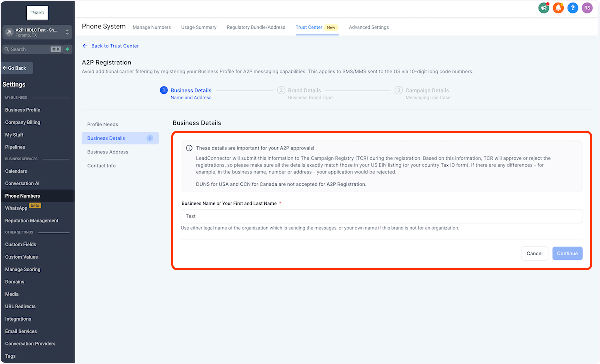
1. Provide Business Details
Enter the legal name of your business or sole proprietorship accurately.
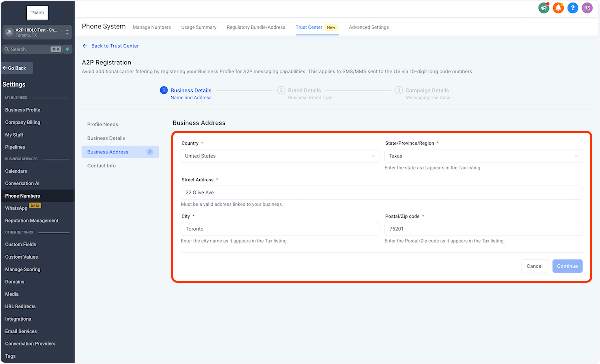
2. Provide Business Address
Enter the physical address of your business. This must be a valid address in the United States or Canada.
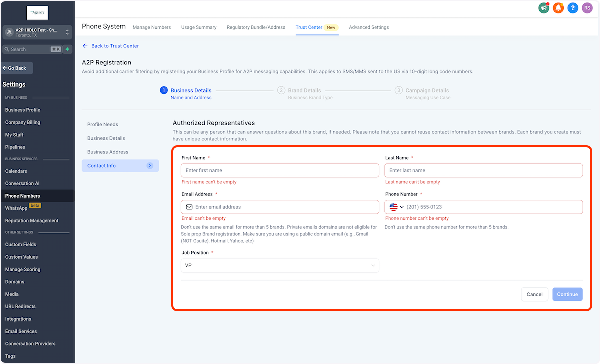
3. Provide Contact Information
Enter your personal contact details, including your first name, last name, email, and a direct mobile phone number. This mobile number is critical for the OTP verification step.
4. Describe Business Use Case
Select the primary category that best describes how you will use messaging (e.g., marketing, customer care, notifications).

5. Review Brand Details
Carefully review all the information you have entered for your brand before final submission.
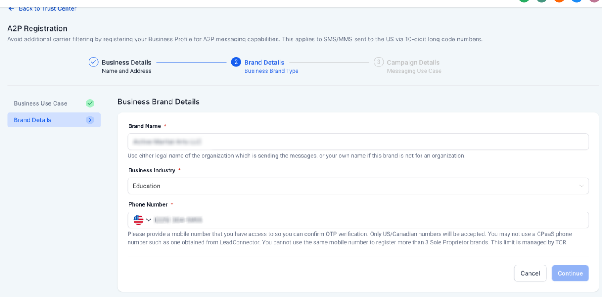
6. Complete OTP Verification
Critical Step: Shortly after submission, the TCR (The Campaign Registry) will send a text message to the mobile number you provided. You must reply "YES" to this message to authorize your brand and complete the verification. Failure to do so will cause registration to fail.
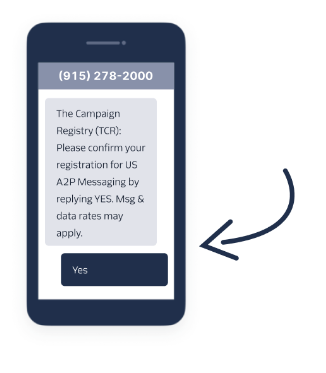
Once your brand is approved via this OTP, your associated campaign will be automatically submitted for review. Approval times can vary.
Important Verification Notes
- The mobile number used for OTP must be a direct, non-VoIP line (not from Google Voice, your CRM, or other CPaaS providers).
- A single mobile number can only be used for OTP verification in a maximum of three total A2P brand registrations across all service providers, not just your CRM.
Common Reasons for Registration Failure
If your Sole Proprietor registration is rejected, review this list of common issues:
- Using placeholder text or custom field variables instead of real names and business names.
- Missing required opt-out language in your message templates.
- Using the same email address, phone number, or physical address in more than 10 separate Sole Proprietor registrations.
- Using the same phone number for OTP verification in more than 3 total registrations (as noted above).
- Using an email address from a private domain. Use a public email provider like Gmail (personal, not G Suite), Yahoo, or Outlook.com.
- Using a VoIP number (like Google Voice) as the contact/OTP number instead of a direct mobile line.
- Fundamentally not qualifying: Your registration will fail if you actually have a Tax ID or are not located in the US/Canada. In such cases, you must pursue Standard Brand registration.