Troubleshooting when Conversations are glitching
Understanding Conversation Glitches in Your CRM
If you notice unexpected behavior in your Conversations section, such as calls or messages appearing to be grouped incorrectly or split apart, this guide will help you identify the cause.
Incoming Calls from Different People Attributed to a Single Number
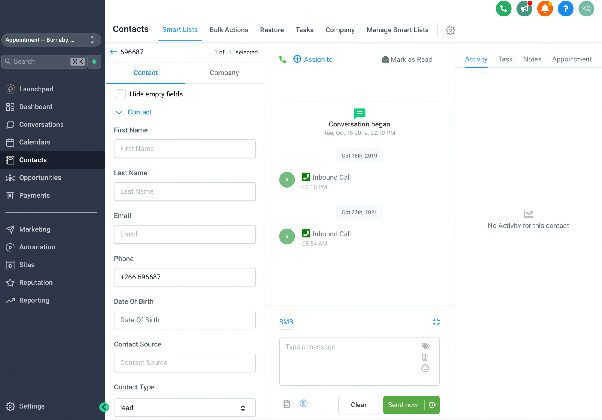
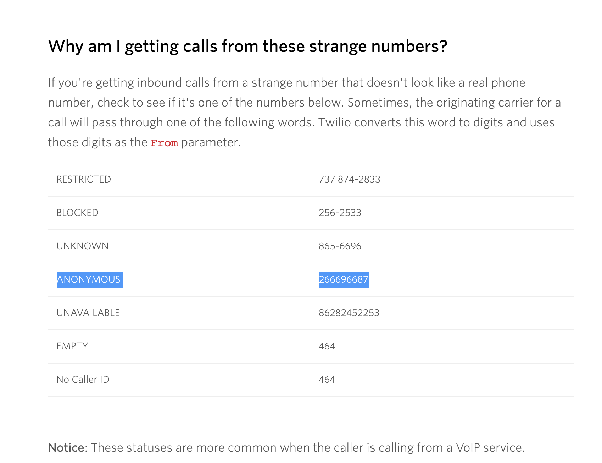
This issue occurs when incoming calls from multiple individuals are all logged under the same phone number in your CRM, such as a generic number like +266696687. The most common reason for this is that the callers are using an anonymous calling service or a number masking feature, which routes their calls through a single, shared number before reaching your business line.
As a result, your CRM cannot distinguish between the original callers and groups all the activity under the shared number. This can make it difficult to track individual leads or customers.
Replies Appearing in Separate Conversations
If you see multiple conversation threads for what seems to be the same contact or topic, it is often because your business phone number is included in a group text or group MMS. When a contact replies within a group chat that includes your number, the CRM may create a new, separate conversation thread for that reply instead of grouping it with previous messages.
This happens because the CRM’s messaging system currently does not support Group SMS or MMS threading. Each message from the group is treated as an individual interaction. To help prioritize the development of group messaging features in the future, you can submit or vote for this feature through the CRM’s feature request system.